-
A Capable MS-Office Alternative
Oct 24, 2025
In the computing world, many of us who have been steeped in Microsoft products were also brought up on MS-Office. It could be had as the Standard, Professional or Home and Student Edition. The basic applications common to all versions are Word, Excel, and PowerPoint. Generally, these software suites were both a blessing and a curse. Right when you got comfortable with using it, Microsoft decided to “improve” it. Sometimes the changes to the interface were substantial with a corresponding increase in price, complexity, and ever-steepening learning curve.
The last stand-alone version you could buy was Office 2019. Recall that MS-Office was never a cheap proposition, with the cheapest discounted Home and Student edition still costing over $100. Now Microsoft has embraced the subscription model for many of their products including Office, which is now Office 365. For some of us the annual fee is a bit easier to deal with. The downside is that Microsoft wants you to have an MS-Live account and sign in each time to get the full benefit of the product. I hate having to sign in to use a product just as much as using the Cloud as a default to store files. However, there are other Office-like products available so you do have some options.
Chief among them are Corel’s WordPerfect Suite. Surprise! They’re still in business and going strong. Unlike Microsoft, theirs is not a subscription-based product and they interact well with native MS-Office file formats. You pay, download, and install it just like any other software. However, because it’s not a subscription, the $100 to $250 all-at-once pricing is a bit of sticker shock. But don’t fret, you still have other choices.
Other alternative Office Suite-products worth mentioning are Only Office and the other is LibreOffice. They are both “open-source” applications. This mean that the source code for them is freely available, making it free to download and use. They are found primarily in Linux-based computers. But the producers have Windows versions that are also free to use. The user experience might seem slightly dated but free is free – I could live with that. Of the two, my personal favorite is Only Office.
Like Microsoft, the Only Office people want you to sign up for some online storage. It’s free but, unlike Microsoft, you’re not obligated to use the online storage. Only Office will still save to your PC or local file server if you have one whereas Microsoft requires you to sign in to their OneDrive cloud account to access the Office 365 apps. The other difference is in the fonts.
The font library included with the open-source products is more than adequate to get you up and running. Although they can open, edit, and save documents created in Microsoft Office, just be aware that they will try to substitute certain fonts for the ones used in your original Microsoft document. This is because Microsoft had patented some of the most used fonts. Being open-source, these companies couldn’t include them with their software. The licensing simply prohibits it.
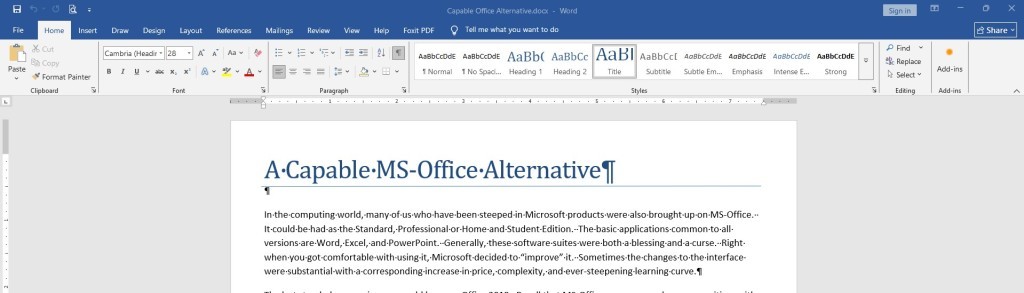
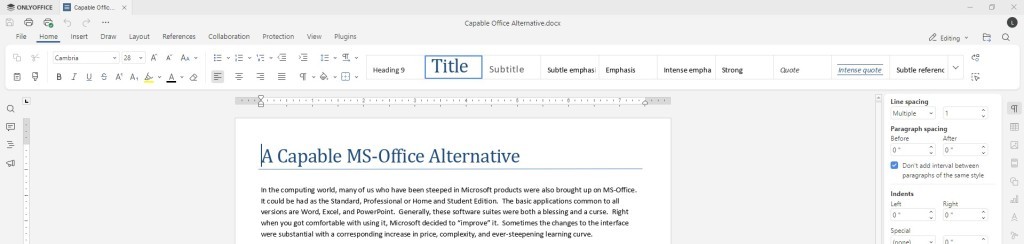
However, nothing legally stops you from downloading the Microsoft fonts yourself as they are freely available from Microsoft or elsewhere on the Internet. Once installed in your PC, the Only Office and LibreOffice suites will use them and work just fine with your existing files. If you’ve just blown the budget on a new Windows 11 computer, there are other ways to get a fully functioning Office Suite of programs without giving Microsoft any more of your hard-earned cash! Best of all they are free to use. See the pictures below and then you can decide if one of them is for you.
First is MS-Word:
Next is LibreOffice:
Finally, here is my personal favorite free Office Suite offering; Only Office:
 Finally, here is my personal favorite free Office Suite offering; Only Office:
Comments
- (no comments)